Python
Python 是一个非常适合数学计算的语言,因为它非常好写,而且有了 numpy 和 matplotlib 这两个库文件,Python 可以在许多情况下代替 Matlab 这样昂贵的(至少在中国很昂贵)商业软件。
Python 提供了一个包管理器 pip,在 Windows 上它运行良好,但是在 Debian/Ubuntu 上默认禁止使用 pip 来安装库文件。
error: externally-managed-environment
× This environment is externally managed╰─> To install Python packages system-wide, try apt install    python3-xyz, where xyz is the package you are trying to    install.
    If you wish to install a non-Debian-packaged Python package,    create a virtual environment using python3 -m venv path/to/venv.    Then use path/to/venv/bin/python and path/to/venv/bin/pip. Make    sure you have python3-full installed.
    If you wish to install a non-Debian packaged Python application,    it may be easiest to use pipx install xyz, which will manage a    virtual environment for you. Make sure you have pipx installed.
    See /usr/share/doc/python3.11/README.venv for more information.
note: If you believe this is a mistake, please contact your Python installation or OS distribution provider. You can override this, at the risk of breaking your Python installation or OS, by passing --break-system-packages.
这个报错看起来有点唬人,因为后面有个 —break-system-packages 推荐的解决方法是
python3 -m venv venv # 创建 | python3.12 -m venv venvsource venv/bin/active # 启用deactive # 退出显然 venv/bin 目录下的 active 是一个脚本,可以查看到它的内容如下
# This file must be used with "source bin/activate" *from bash*# You cannot run it directly
deactivate () {    # reset old environment variables    if [ -n "${_OLD_VIRTUAL_PATH:-}" ] ; then        PATH="${_OLD_VIRTUAL_PATH:-}"        export PATH        unset _OLD_VIRTUAL_PATH    fi    if [ -n "${_OLD_VIRTUAL_PYTHONHOME:-}" ] ; then        PYTHONHOME="${_OLD_VIRTUAL_PYTHONHOME:-}"        export PYTHONHOME        unset _OLD_VIRTUAL_PYTHONHOME    fi
    # Call hash to forget past locations. Without forgetting    # past locations the $PATH changes we made may not be respected.    # See "man bash" for more details. hash is usually a builtin of your shell    hash -r 2> /dev/null
    if [ -n "${_OLD_VIRTUAL_PS1:-}" ] ; then        PS1="${_OLD_VIRTUAL_PS1:-}"        export PS1        unset _OLD_VIRTUAL_PS1    fi
    unset VIRTUAL_ENV    unset VIRTUAL_ENV_PROMPT    if [ ! "${1:-}" = "nondestructive" ] ; then    # Self destruct!        unset -f deactivate    fi}
# unset irrelevant variablesdeactivate nondestructive
# on Windows, a path can contain colons and backslashes and has to be converted:case "$(uname)" in    CYGWIN*|MSYS*|MINGW*)        # transform D:\path\to\venv to /d/path/to/venv on MSYS and MINGW        # and to /cygdrive/d/path/to/venv on Cygwin        VIRTUAL_ENV=$(cygpath /workspace/Docs/Docs/venv)        export VIRTUAL_ENV        ;;    *)        # use the path as-is        export VIRTUAL_ENV=/workspace/Docs/Docs/venv        ;;esac
_OLD_VIRTUAL_PATH="$PATH"PATH="$VIRTUAL_ENV/"bin":$PATH"export PATH
VIRTUAL_ENV_PROMPT=venvexport VIRTUAL_ENV_PROMPT
# unset PYTHONHOME if set# this will fail if PYTHONHOME is set to the empty string (which is bad anyway)# could use `if (set -u; : $PYTHONHOME) ;` in bashif [ -n "${PYTHONHOME:-}" ] ; then    _OLD_VIRTUAL_PYTHONHOME="${PYTHONHOME:-}"    unset PYTHONHOMEfi
if [ -z "${VIRTUAL_ENV_DISABLE_PROMPT:-}" ] ; then    _OLD_VIRTUAL_PS1="${PS1:-}"    PS1="("venv") ${PS1:-}"    export PS1fi
# Call hash to forget past commands. Without forgetting# past commands the $PATH changes we made may not be respectedhash -r 2> /dev/null
这个脚本主要是将虚拟环境的路径添加到了环境变量中,同时用 _OLD_VIRTUAL_PATH 缓存了旧的环境变量以确保可以用 deactive 命令还原。最后在命令行的开头添加了 (venv) 以做提醒。于是现在可以自由的使用 pip,下载的所有文件都会保存到 venv 路径中不会对系统造成任何影响。
Module
Section titled “Module”python3 -husage: python3 [option] ... [-c cmd | -m mod | file | -] [arg] ...Options (and corresponding environment variables):--------------- a lot of args ------------------------------------m mod : run library module as a script (terminates option list)--------------- a lot of args -----------------------------------按照 python3 -h 的输出结果来看,-m 参数可以以一个脚本的形式执行 Python 库中的一个模型。其中比较有用的有
http.server
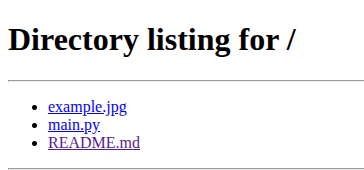
Section titled “http.server”python3 -m http.server这样会直接监听 0.0.0.0:8000 端口,对于如下目录结构,在浏览器中访问该地址就会看到
Directorysrc
- example.jpg
- main.py
- README.md
uploadserver
Section titled “uploadserver”pip install uploadserverpython -m uploadserver这是一个需要单独下载的模块,多了一个上传文件的按钮。
需要一个公网 IPv4 或者 IPv6 地址。公网 IPv4 一般只在云服务器上出现,但是 IPv6 就到处都是了。
python3 -m http.server -b ::IPv6 过长,大多数情况下会用 :: 来表示地址中连续的 0 。上面的 :: 即为
0000:0000:0000:0000:0000:0000:0000:0000所以会产生以下两种不同的输出
Serving HTTP on :: port 8000 (http://[::]:8000/) ...Serving HTTP on 0.0.0.0 port 8000 (http://0.0.0.0:8000/) ...关于内网穿透,这个会在 Cloud 章节中介绍。绝大多数情况下,IPv6 都是最好的选择。无论你以何种方式传输文件,最终的速度都不会超过中国运营商的硬性限速,大约 30~50Mbps